HTTP vs HTTPS, Explained
What the S actually stands for, how TLS protects your connection, and why every website should use HTTPS even if it doesn't handle passwords.
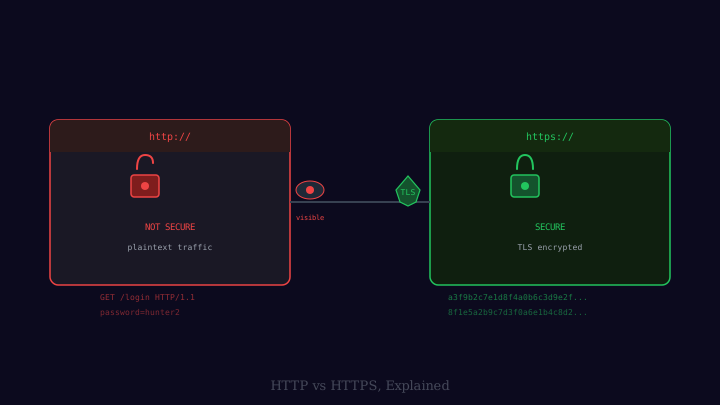
You have probably noticed that website addresses in your browser begin with either http:// or https://. The padlock icon appears for one and not the other. Many people have a vague sense that HTTPS is “more secure,” but the details — what exactly is being protected, and how — are worth understanding properly. They reveal something important about the nature of the internet and why the shift to HTTPS everywhere was a significant turning point in online privacy.
HTTP: The Foundation
HTTP (HyperText Transfer Protocol) is the fundamental protocol that browsers and web servers use to communicate. When you type an address into your browser and press Enter, your browser sends an HTTP request to a web server asking for a specific resource — a page, an image, a script. The server responds with the content, and your browser renders it.
HTTP is a text-based protocol. The messages — requests and responses — are human-readable strings. A simple HTTP GET request looks something like:
GET /articles/http-vs-https HTTP/1.1
Host: example.com
Accept: text/html
And the server’s response begins with a status line like HTTP/1.1 200 OK followed by headers and the page content.
The problem is that this text travels across the internet without any protection. Anyone who can observe traffic on the network path between your device and the server — on the same Wi-Fi network as you, at your internet service provider, at a network exchange point — can read it in full. They can see exactly which page you requested, what the server responded with, and any data you submitted in a form.
What HTTPS Adds
HTTPS is HTTP running over a security layer called TLS (Transport Layer Security). The “S” stands for Secure. TLS is a protocol designed to do three things:
Encryption. TLS encrypts the entire HTTP exchange so that anyone intercepting the traffic sees random-looking bytes rather than meaningful content.
Authentication. TLS verifies that you are actually communicating with the server you intended to reach, not an impostor.
Integrity. TLS ensures that the content has not been modified in transit between the server and your browser.
All three matter. Encryption without authentication would protect your data from being read but not from being intercepted and replaced (a “man-in-the-middle” attack). Authentication without encryption would confirm the identity of the server but leave the content readable.
Certificates and Certificate Authorities
The authentication in TLS is built on digital certificates — documents that assert the identity of a server and are signed by a trusted third party.
When a website owner wants to enable HTTPS, they obtain a TLS certificate from a Certificate Authority (CA) — an organisation that verifies the owner’s identity (at least confirming that they control the domain name) and then digitally signs the certificate. Your browser and operating system come pre-loaded with a list of trusted root certificate authorities. When your browser connects to a site over HTTPS, it checks that the server’s certificate was signed by one of these trusted authorities and that the domain name in the certificate matches the address you requested.
If the certificate is valid and trusted, you get the padlock. If the certificate is expired, self-signed (not from a trusted CA), or does not match the domain, the browser shows a warning.
The TLS Handshake
Before any HTTP data can flow, the browser and server perform a TLS handshake — a brief exchange that establishes the encrypted connection. Simplified, it works like this:
- The browser connects to the server and announces which versions of TLS and which encryption algorithms it supports.
- The server responds by selecting the best mutual option and sending its certificate.
- The browser verifies the certificate.
- Both sides use a form of asymmetric cryptography (using the server’s public key from the certificate) to negotiate and agree on a shared session key without transmitting that key directly. An eavesdropper who records this exchange cannot recover the session key.
- From this point, all communication is encrypted symmetrically using the session key — symmetric encryption is much faster than asymmetric for large volumes of data.
The entire handshake happens in a fraction of a second, so the additional latency of HTTPS compared to HTTP is small and largely imperceptible to users.
Why HTTPS Matters Even for Read-Only Sites
A common misconception is that HTTPS is only important for login pages and e-commerce checkouts. In fact, there are several reasons it matters for all websites.
Privacy from your ISP and network observers. Even on a purely informational site, your reading history is personal. Over HTTP, every page you visit on a site is visible to anyone on the network path. Over HTTPS, only the domain name is visible (revealed by DNS and by the TLS handshake’s Server Name Indication field); the specific pages you read are private.
Protection against content injection. ISPs and network intermediaries have been documented injecting advertising, tracking scripts, or unwanted content into unencrypted HTTP responses. HTTPS makes this impossible.
Authenticity. You can be confident that the page you are reading is what the server actually sent, not a modified version altered by a network intermediary.
Search ranking. Since 2014, Google has used HTTPS as a minor ranking signal in search results, meaning HTTPS sites receive a small boost.
The Padlock Is Not a Trust Signal
One important clarification: the padlock tells you that your connection to the server is encrypted and that the server’s identity matches the domain you requested. It does not tell you anything about whether the website is trustworthy, legitimate, or free from malicious content. A phishing site — a fake bank login designed to steal your credentials — can have a valid TLS certificate and a padlock just as easily as a legitimate site. The encryption protects the connection; it says nothing about the trustworthiness of what is on the other end.
HTTPS has become the default across the web. Web browsers now explicitly mark HTTP sites as “not secure,” and services like Let’s Encrypt have made obtaining free TLS certificates straightforward enough that there is no longer a good reason for any website to serve content over unencrypted HTTP.