Bits vs Bytes, Explained
Why your internet speed is measured in megabits but your file sizes are in megabytes — and how to make sense of the units that define digital data.
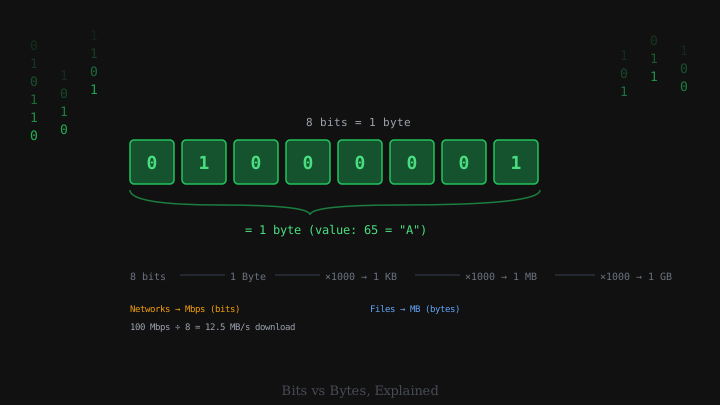
You have almost certainly encountered a confusing mismatch. Your internet service provider advertises speeds of 100 megabits per second. Your download manager shows a speed of 12 megabytes per second. Your hard drive stores 500 gigabytes. Your photo file is 4 megabytes. These numbers involve related but importantly different units — bits and bytes — and the difference between them causes genuine confusion every day. Understanding the distinction clearly makes the whole digital world a little less opaque.
What Is a Bit?
At its most fundamental level, every piece of digital information is stored or transmitted as a series of binary digits: bits. A bit is the smallest possible unit of data. It has only two possible values: 0 or 1. In physical hardware, a bit might be represented as a high or low voltage, the orientation of a tiny magnet on a hard drive platter, or the presence or absence of charge in a flash memory cell.
Every digital file, every image, every piece of music, every character of text is ultimately encoded as a long sequence of 0s and 1s. Binary is the natural language of electronics because transistors have two stable states — on and off — that map perfectly to 1 and 0.
Eight Bits Make a Byte
In practice, bits are almost never used individually. They are grouped into units of eight: a byte. The byte is the standard unit of digital storage. A single byte can hold one of 256 different values (2 to the power of 8), which is enough to represent a character in most text encodings, a single colour channel in an image, or a small number.
The reason eight was chosen is partly historical and partly practical. In the early days of computing, different machines used different grouping sizes — six-bit “characters,” ten-bit bytes, and others. Eight-bit bytes eventually won because they balanced convenience and efficiency well, and because they could represent the full ASCII character set (which required seven bits, with one bit left over for parity or extension).
From here, the naming convention works up by roughly a thousand at each step:
| Unit | Abbreviation | Size |
|---|---|---|
| Kilobyte | KB | ~1,000 bytes |
| Megabyte | MB | ~1,000,000 bytes |
| Gigabyte | GB | ~1,000,000,000 bytes |
| Terabyte | TB | ~1,000,000,000,000 bytes |
The “roughly” in those figures conceals an ongoing source of confusion (more on that below).
Bits per Second vs Bytes per Second
The critical practical difference is how bits and bytes appear in measurements:
Storage capacity is measured in bytes. Your hard drive holds 500 gigabytes. A photo is 4 megabytes. A movie is 4 gigabytes.
Data transfer speed — especially network and internet speeds — is traditionally measured in bits per second. Your internet connection might run at 100 megabits per second (abbreviated Mbps or Mb/s). This convention originated in telecommunications, where serial transmission of individual bits is natural.
Because there are eight bits in a byte, the conversion is straightforward: divide the bit rate by eight to get the byte rate. A 100 Mbps internet connection transfers data at approximately 12.5 megabytes per second (100 ÷ 8 = 12.5). This is why a download manager showing 12.5 MB/s is delivering exactly what a 100 Mbps connection promises — the units just look different.
When you see a lowercase “b” in a speed measurement (Mbps, Gbps), it almost always means bits. An uppercase “B” means bytes. This convention is not universally followed, which causes endless confusion, but it is the standard.
The Decimal vs Binary Prefix Problem
Here is the other major source of confusion. When engineers and computer scientists say “kilo,” they sometimes mean 1,000 (as in the metric system) and sometimes mean 1,024 (which is 2 to the power of 10 — a rounder number in binary arithmetic).
This inconsistency created real problems. Hard drive manufacturers used decimal (1,000-based) prefixes in their marketing, meaning a “500 gigabyte” drive held 500 × 1,000,000,000 = 500,000,000,000 bytes. Operating systems reported drive sizes using binary (1,024-based) interpretation, so the same drive appeared as 465 gigabytes in Windows. Neither was lying — they were using different definitions of “giga.”
To resolve this, the International Electrotechnical Commission standardised binary prefixes in 1998:
| Binary unit | Abbreviation | Exact size |
|---|---|---|
| Kibibyte | KiB | 1,024 bytes |
| Mebibyte | MiB | 1,048,576 bytes |
| Gibibyte | GiB | 1,073,741,824 bytes |
| Tebibyte | TiB | 1,099,511,627,776 bytes |
In strict usage: hard drives are measured in gigabytes (decimal); operating system memory is often reported in gibibytes (binary). The distinction is widely ignored in casual use, which is why the same drive can appear to “lose” storage between the box and your file manager.
Common Conversions Worth Remembering
A few numbers are worth having in mind for practical context:
- 1 byte: approximately one character of plain text.
- 1 kilobyte: a short text email with no attachments.
- 1 megabyte: roughly one thousand pages of plain text, or a few seconds of compressed audio.
- 1 gigabyte: about 250 songs in standard MP3 quality, or roughly 10 minutes of HD video.
- 1 terabyte: 1,000 hours of standard-definition video, or the capacity of a typical consumer laptop hard drive.
For network speeds: a 1 Gbps (gigabit per second) fibre connection can theoretically transfer a 1 GB file in eight seconds. In practice, protocol overhead, server limits, and congestion reduce this.
Why This Matters
The bits-vs-bytes distinction is practical, not just academic. When comparing internet plans, look at the download speed in Mbps and divide by eight to estimate how quickly large files will actually arrive. When choosing cloud storage, understand that 1 GB of storage holds roughly 1,000 four-megabyte photos. When a file transfer shows seconds remaining, the speed shown in MB/s is eight times smaller than the line speed in Mbps — and both are correct.
Once you have the conversion in your head — eight bits to a byte, lowercase b for bits, uppercase B for bytes — the confusion resolves. Almost every confusing number in digital specifications becomes simple arithmetic.