What Is an API In depth
A complete guide to application programming interfaces — what they are, how REST APIs work, authentication, webhooks, and why APIs underpin almost everything in modern software.
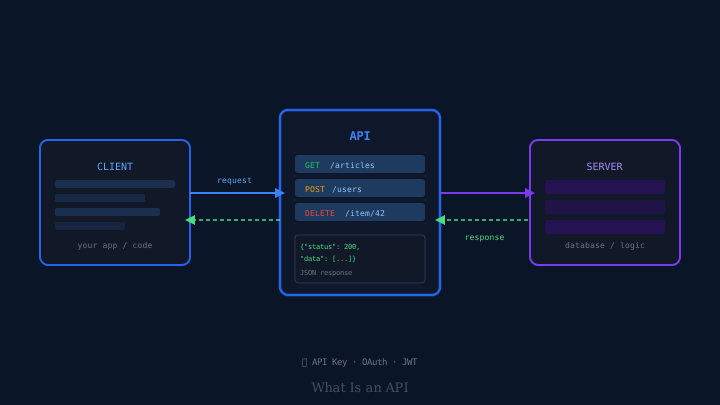
You have almost certainly used an API today without knowing it. When you checked the weather in an app, the app did not build its own global weather monitoring system — it sent a request to a weather service’s API. When you paid for something online, your bank’s app did not build its own payment processing network — it used a payments API. When you logged into a website using your Google account, both sides used an authentication API to verify your identity. APIs are the connective tissue of modern software, enabling applications to talk to each other without needing to know how each other works internally.
This is the complete explanation.
The Restaurant Analogy
The most useful way to understand APIs is through a concrete analogy. Imagine a restaurant.
You are the customer. You want food. The kitchen can make food. But you cannot walk directly into the kitchen, shout at the cooks, and grab ingredients. The kitchen is a complex, private system you have no business interfering with.
Instead, there is a waiter. The waiter takes your order, carries it to the kitchen in a standardised format the kitchen understands, and brings back the result. You do not need to know how the kitchen is organised. The kitchen does not need to deal with individual customers. The waiter is the interface between the two.
An API (Application Programming Interface) is the waiter in this analogy. It is a defined interface between two pieces of software: it specifies what requests you can make, in what format, and what responses you will receive. One side does not need to understand or access the internal workings of the other.
What “Interface” Means
The word “interface” is doing the real work in the term. An interface is a defined boundary between two systems — a set of rules about how they interact without either side needing to see the other’s internals.
The keyboard is an interface between you and your computer. You press keys according to a defined set of rules (key positions, modifier combinations), and the computer responds in defined ways. You do not need to understand how the computer’s processor interprets keystrokes; the keyboard interface abstracts that away.
An API is the same idea, but between software systems instead of human and machine. One system exposes a defined set of endpoints — URLs or function calls that accept specific inputs and return specific outputs. Any other system that knows the interface can use it, regardless of what language, platform, or architecture either system is built on.
REST APIs: The Dominant Style
There are many ways to design an API. The style that has dominated web development for the past 15 years is REST (Representational State Transfer). REST is not a protocol or a standard — it is an architectural style, a set of conventions for how APIs should be structured using the technologies already built into the web.
REST APIs communicate over HTTP, the same protocol your browser uses to fetch web pages. They have several key characteristics:
Endpoints are resources. A REST API organises its functionality around resources — things, not actions. A blog platform’s API might have endpoints for /articles, /users, and /comments. Each endpoint represents a resource, and you interact with it using standard HTTP methods.
HTTP methods express intent. REST APIs use the HTTP method to communicate what you want to do:
GET /articles— retrieve a list of articlesGET /articles/42— retrieve a specific article with ID 42POST /articles— create a new articlePUT /articles/42— replace article 42 entirely with new contentPATCH /articles/42— update specific fields of article 42DELETE /articles/42— delete article 42
Responses use standard status codes. HTTP status codes convey the outcome: 200 OK means success; 201 Created means a new resource was created; 400 Bad Request means the request was malformed; 401 Unauthorized means the caller is not authenticated; 404 Not Found means the resource does not exist; 500 Internal Server Error means something went wrong on the server.
The format is usually JSON. REST APIs almost universally exchange data in JSON (JavaScript Object Notation), a lightweight text format for structured data. A response from a weather API might look like:
{
  "location": "London",
  "temperature": 14,
  "unit": "celsius",
  "conditions": "partly cloudy",
  "humidity": 72
}
JSON is human-readable, easy to parse in almost every programming language, and compact enough for efficient transmission.
Making an API Request
When an application makes an API request, it is essentially sending an HTTP message with specific properties. A request typically has:
- A method — GET, POST, PUT, etc.
- A URL — the full endpoint address, often with query parameters appended (e.g.,
/articles?section=technology&limit=10) - Headers — metadata about the request, including authentication credentials, the format being sent, and the format expected in return
- A body (for POST, PUT, PATCH) — the data being sent, usually in JSON format
The server processes the request and sends back an HTTP response with a status code, headers, and usually a body containing the requested data or a confirmation of the action taken.
Authentication: Proving Who You Are
Public APIs that provide freely accessible data — earthquake data, currency exchange rates, Wikipedia content — may require no authentication at all. But most APIs need to know who is making a request, both to control access and to enforce rate limits.
API keys are the simplest approach. The service gives you a unique secret string — a long random character sequence — that you include in your requests (usually in a header or a query parameter). The service logs and tracks usage by API key. If a key is abused, the service can revoke it. API keys identify the application or developer, not the individual user.
OAuth (Open Authorization) handles a more complex scenario: authorising an application to act on behalf of a user. When you click “Log in with Google” or “Connect to your Twitter account,” OAuth is at work. Rather than sharing your password with a third-party application, OAuth allows you to grant that application specific, limited permissions (read your profile, post on your behalf, access your contacts) without it ever seeing your credentials. You authenticate with Google or Twitter directly; they issue a temporary token to the third-party application; the application uses that token for the specific actions you authorised.
JWT (JSON Web Tokens) is a format for encoding authentication and authorisation information in a compact, verifiable token that can be passed between systems. After you log in, the server might issue you a JWT containing your user ID and permissions. Your client includes this token in subsequent requests; the server can verify and decode it without querying a database on every request.
Rate Limiting: Traffic Management
APIs almost universally impose rate limits — restrictions on how many requests a caller can make within a given time window. A free tier might allow 100 requests per hour; a paid tier might allow 10,000 per minute.
Rate limits exist for good reason: they prevent any single client from overwhelming the server, ensure fair access across many users, and create a business model for tiered pricing. When you exceed a rate limit, the server typically responds with a 429 Too Many Requests status code and often includes a header indicating when the limit resets.
Well-designed API clients handle rate limits gracefully: they track their own request count, respect retry-after headers, and implement exponential backoff — waiting progressively longer between retries when they receive rate limit errors.
Webhooks: APIs in Reverse
Most APIs follow a pull model: your application requests data when it needs it. A webhook inverts this. Instead of your application asking “has anything changed?” on a schedule, the other service notifies your application immediately when something relevant happens.
You register a webhook by giving a service the URL of an endpoint on your server. When an event occurs — a payment is completed, a form is submitted, a repository receives a commit — the service sends an HTTP POST request to your URL with details about the event, typically in JSON.
Webhooks eliminate the need for polling (making repeated requests to check for changes) and enable real-time integrations. A payment processor can notify your server the instant a transaction completes, rather than your server checking every 30 seconds whether anything has changed. The tradeoff is that your server must be publicly accessible to receive incoming requests, and you must handle cases where webhook deliveries fail or arrive out of order.
API Versioning
APIs change over time. The company offering the API might add new fields, rename existing ones, remove deprecated features, or restructure entire resources. These changes are a problem if they break applications that depend on the old behaviour.
API versioning manages this by maintaining multiple versions of the API simultaneously. A common approach includes the version in the URL: /v1/articles, /v2/articles. When version 2 is released with breaking changes, applications using version 1 continue to work until the provider eventually deprecates and removes it (usually with substantial advance notice). Applications can upgrade to v2 on their own schedule.
Version numbers in APIs are typically integers, not semantic version numbers — API versioning tracks breaking changes, not every release.
APIs and Software Architecture
The ubiquity of APIs reflects a broader architectural philosophy: that complex systems are better built as collections of smaller, independent services that communicate through defined interfaces, rather than monolithic applications where everything is tightly coupled.
When a team builds a mobile app, they expose an API for their backend logic. The iOS team and the Android team both use the same API, reducing duplicated work. When another team builds a web application, they use the same API. When a third-party developer wants to integrate with the platform, the API is what they use. A well-designed API is a platform for everyone else to build on.
This is why technology companies publish developer documentation for their APIs and why access to popular APIs — maps, payment processing, communications, identity — is considered a business-critical asset. The quality and stability of an API directly determines how reliably other systems can be built on top of it.
Seeing APIs in Action
If you want to observe APIs in action on a website you use, open your browser’s developer tools (usually F12), navigate to the Network tab, and load a page. You will see many requests that are not loading HTML pages — they are making API calls to fetch data, check user state, log analytics events, and load content. Most of them will be returning JSON responses. You are looking at the actual API calls that make modern web applications work.
APIs are not a niche concern for specialist developers. They are the architecture that makes it possible for applications to exist in a connected world — where software builds on software, services build on services, and the whole system becomes more capable than any single part could be on its own.